Reversed chord finder for guitar
By using the chord finder, you get chord names from positions on the guitar you choose.
What is a reversed chord finder?
The reversed chord finder is a tool designed to help guitarists identify the name of a chord based on the notes or fingering positions. Unlike traditional chord dictionaries, which show how to play a specific named chord, a reversed chord finder works the other way around: you input the chord shape and the tool tells you what chord it is.
This is especially useful in situations where you've stumbled upon an unfamiliar chord shape, but you don't know the chord name. Instead of guessing, you can enter the position on frets being played on each string into the reversed chord finder. The tool then provides you with the chord name.
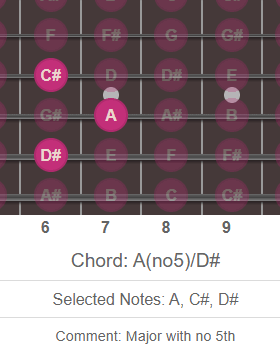
How it works
The reversed chord finder function through a simple interface:
- You input the positions on the interactive fretboard for each string you’re pressing including open strings (or leave it as nothing for a muted string).
- The tool detects the notes based on standard tuning.
- It matches the collection of notes to determine the chord name.
- If the chord matches more than one known chord (which is common), it may list multiple possibilities, often with details like inversions or alternate voicings.
Why use a reversed chord finder?
- Songwriting: When experimenting with new voicings or chord shapes, you can discover what you've created and use it confidently.
- Learning by ear: If you're figuring out songs by listening, this tool helps identify chords you don’t recognize.
- Music theory practice: It’s a great way to learn how chords are constructed and how different voicings relate to the same chord.
- Transcription: If you’re writing out a song, knowing the exact chord names improves accuracy.
A reversed chord finder is like a musical detective for guitarists. It bridges the gap between intuition and theory, turning random shapes into understandable chords.
Guitar-chord.org offers many interactive tools including:
Reversed chord finder = input fingering and get chord name.
Standard chord finder = input chord name and get fingering.
Resources main page | Regular interactive chord finder